Indexable tooling
Turning, milling, CBN and PCD, threading and grooving inserts, designated from their values, drawn, checked and priced.
The design module's own 3D model of the tool, opening on Turning insert. Choose a preset or change a value and the tool and its example price change with it.


- Shape
- C: rhombic, 80 degrees
- Inscribed circle
- 12.7 mm
- Thickness
- 4.76 mm
- Normal clearance
- N: 0 degrees (negative insert)
- Corner radius
- 0.8 mm
- Cutting material
- Coated carbide
- 1 off£84.99
- 5 off£20.19
- 10 off£12.09
- 25 off£7.23
Example unit prices from the design engine, before VAT.
What you can configure
- Insert family
- Turning insert
- Milling insert
- CBN or PCD insert
- Threading insert
- Grooving and parting insert
- Insert
- Maker's series
- Shape and size
- Shape, Normal clearance, Tolerance class, Inscribed circle, Thickness
- Tip
- Tip material, CBN content, ISO 513 cutting material symbol, Construction, Number of tipped corners, Length of tipped cutting edge, Edge preparation by application
- Thread
- Insert size, External or internal, Profile type, Thread form, Pitch, Threads per inch, Pitch range, Partial profile angle
- Groove
- Operation, Cutting width, Corner radius, Cutting edges, Hand, Front (lead) angle, Periphery, Chip former
- Corner and edge
- Corner radius, Wiper edge, Cutting edge condition, Cutting direction, Corner, Wiper insert cutting angle, Clearance of wiper edge, Wiper width
From request to drawing
Design
The true insert is drawn: outline, clearance, corner radius or wiper facet, hole, chip breaker and each CBN or PCD tip.
Rules
The values write the ISO 1832 designation, and the shape, cutting material and corner are checked against the published rules.
Price
The blank, the counted work, inspection and coating are priced.
Documents and files
The rake face DXF, the cutting list and the specification sheet come off the same design, on the quote.
- Customer drawing
- Rake face DXF
- Cutting list with the designation
- Spec sheet
- STEP, STL and GLB
The customer drawing the Indexable tooling design module exports for the tool in its preview on this page: the first sheet, with the dimensioned view, the views of the 3D model, the tool data and its example prices.
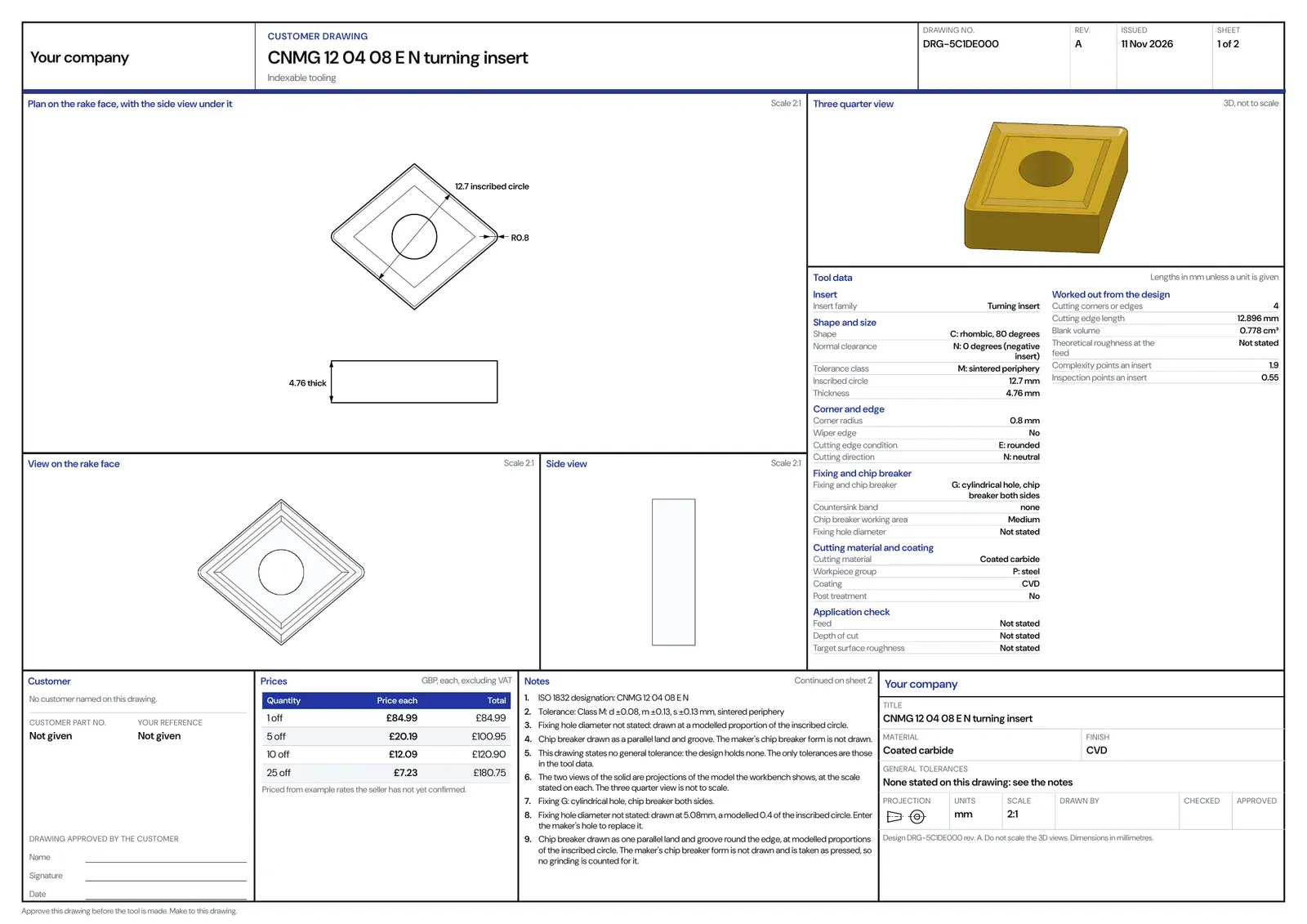
The customer drawing of the tool in the preview
Open the sheetThe wizard for this focus
Wizard turns the application into a specification, then into a recommendation from your own range.
Machining tool selector
What it asks
- The part
- The material
- The machining
- The cut
- Finish and tolerance
- The machine
What it returns
From the part, the material and the cut, the tool to use and the cutting data to run it at: diameter, flutes and coating or the insert, the grade and the chipbreaker, with the speed, the feed, the depth, the removal rate and the power at the cut, every line carrying the published table it was read from, matched to what you hold.
Industrial operations, transformed.
Book a walkthrough on a live demonstration in indexable tooling.